Scribe QuestHuman Quest · Planning
Menu
How it worksDemosPricingPrivacyFAQOpen the appHuman Quest
Open the app

Your conversations, made useful

Remember what mattered. Act on what comes next.

Scribe Quest turns important conversations into clear summaries, ideas, people, and next steps, so the value does not disappear when the call ends.

  • Private by design
  • Audio storage is opt-in
  • No credit card
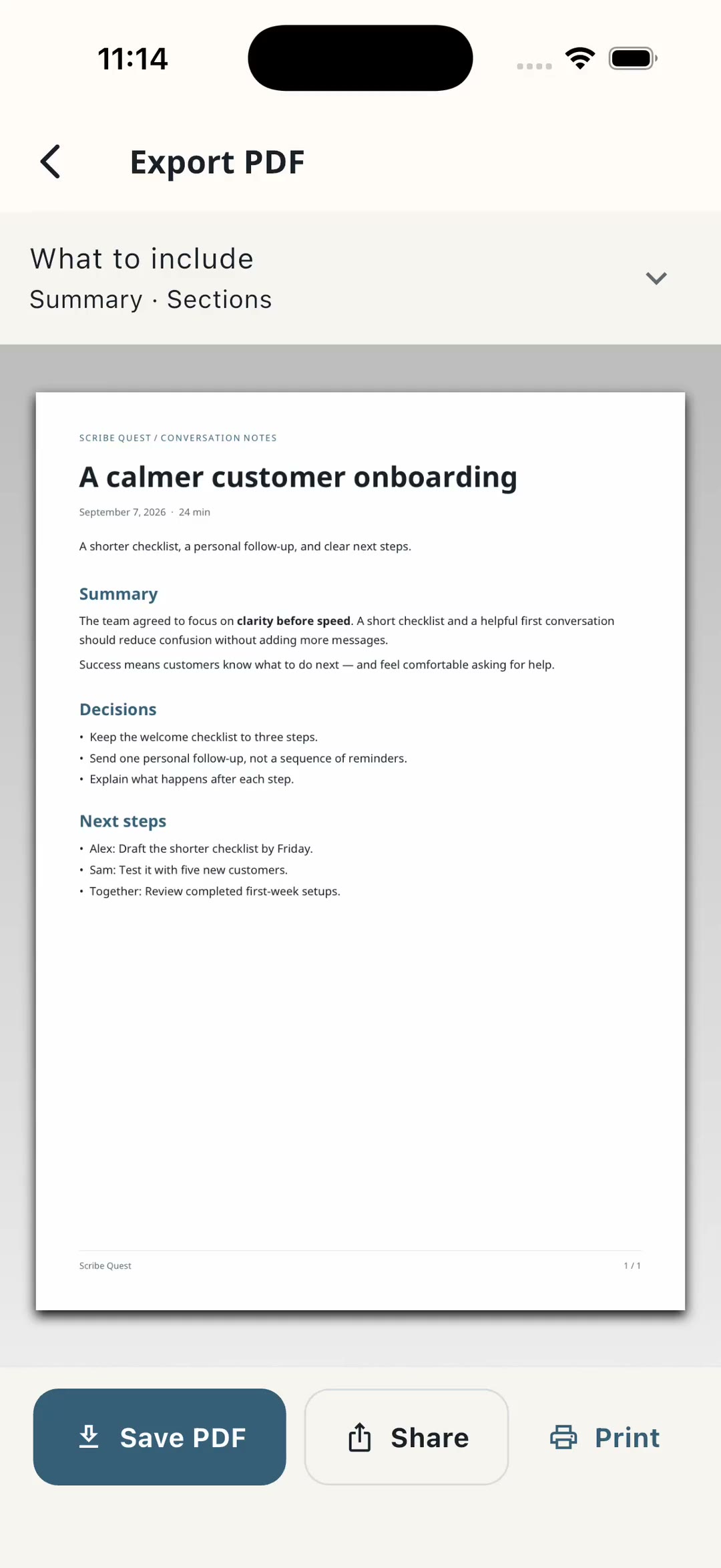
Scribe Quest exporting a conversation as a PDF with its summary, decisions and next steps
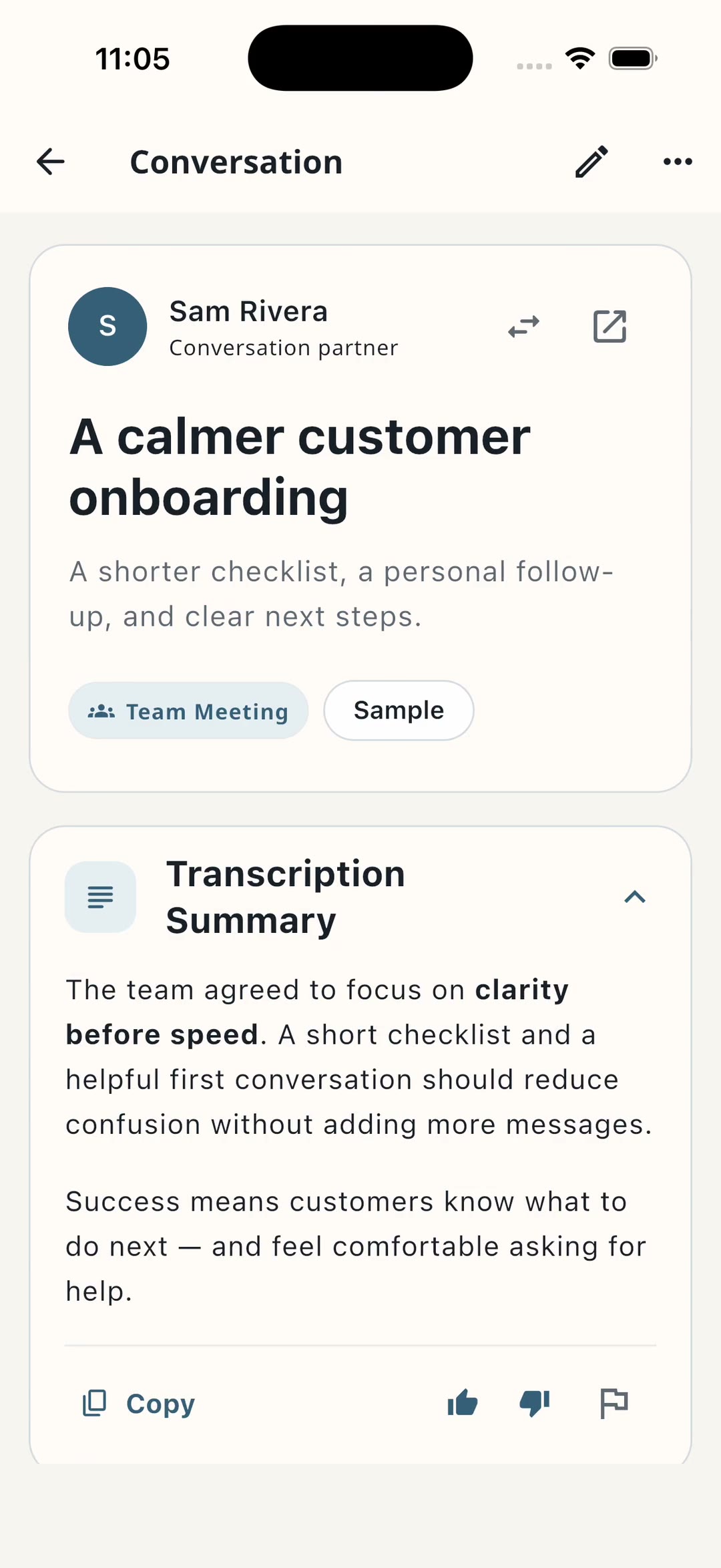
A saved conversation in Scribe Quest with its transcription summary

For conversations that create work

  • Coaching
  • Consulting
  • Client calls
  • Interviews
  • Research

A lighter follow-up workflow

From conversation to clarity in three moves.

Less admin after the call. More attention during it.

1

Capture the conversation

Record when it matters, or start with a quick written note. You stay in control of the microphone.

2

Find the signal

Turn a long conversation into a clear summary, decisions, ideas, and the people involved.

3

Move the work forward

Leave with practical next steps instead of replaying the whole conversation in your head.

See the app in motion

Walk away knowing what to remember, and what to do.

A transcript records every word. Scribe Quest keeps the meaning and the momentum. Three short looks at real app screens.

01

Return to what mattered

Move from a saved conversation to its summary, decisions, and next steps.

Read the walkthrough

Start with a sample conversation. Keep the summary, decisions, and next steps together, then return to the original transcript whenever you need more context.

02

Look behind a connection

Inspect a hypothesis and follow its quote back to the source transcript.

Read the walkthrough

Read a relationship in context. This connection is labeled as a hypothesis, not a proven cause. Open the quoted source to see exactly what was said.

03

Choose what you share

Preview your PDF and choose whether to include the transcript and source excerpts.

Read the walkthrough

Choose what to share. Preview a PDF with your summary and relationship map, and decide whether to include the transcript and source excerpts before exporting.

Recorded in the iPhone simulator using a synthetic sample workspace. Summaries and maps are preloaded examples, not a live AI generation. Narration uses a locally generated voice.

Start private, upgrade when useful

On-device is free forever. Pay only for the cloud.

The default stays local and useful. Scribe Pro is for people who want higher accuracy and a full meeting copilot.

Free forever

On-device

$0

Private capture without a subscription.

  • On-device transcription by default
  • Offline capture where supported
  • Raw transcripts and manual notes
  • No cloud AI required
Start free

Scribe Pro · Meeting copilot

Complete meeting memory

$12/ month

Or $99 per year. Cancel anytime.

  • High-accuracy cloud transcription
  • Speaker-aware summaries and action items
  • Saved audio and playback
  • Live suggestions and meeting intelligence
Upgrade to Pro

Web subscriptions use Stripe. iPhone and Android purchases are handled by the App Store or Google Play.

Privacy is part of the flow

A microphone should never feel like a trap.

Scribe Quest asks at the moment access is needed, explains why, and gives you a way forward if you choose not to record.

Read the privacy policy
  • You choose when to record

    Microphone access is requested in context, not on a mystery screen.

  • Audio retention is a choice

    Saving the original audio is optional and explained before it matters.

  • Clearer data decisions

    The product distinguishes capture, transcription, and AI assistance instead of hiding them behind one permission.

Good questions

Before you press record.

Still unsure? Start with a written note and explore at your own pace.

What is Scribe Quest for?

It is for conversations that create follow-up work: coaching sessions, client calls, interviews, research, and any discussion you need to remember and act on later.

Do I have to record every conversation?

No. You decide when the microphone is used, and you can also start with a written note. Recording is a tool, not a requirement.

Does Scribe Quest keep my audio?

Not on the free plan. On-device transcription does not upload or retain the original recording. Scribe Pro can save audio when you explicitly turn that option on.

What stays free?

On-device transcription and raw transcripts are free forever and remain the default. Scribe Pro unlocks cloud transcription, AI summaries, action items, saved audio, and advanced meeting intelligence.

Is it ready for production use?

Scribe Quest is currently in beta. The core capture and follow-up experience is available now, while the product continues to improve across web and mobile.

Start with the next conversation

Keep the insight. Lose the follow-up fog.

One workspace, four ways in. Use the web app or download for Android. Apple apps are available through TestFlight ahead of the App Store launch.